JS PORTFOLIO
/
B2B SAAS
/
HEALTHCARE
B2B SaaS
Healthcare RCM
Design System

ROLE
Product Designer
SERVICE PROVIDED
Product Design, Design System, Insurance/RCM Workflow Design
SCOPE
Lite version of full product + Insurance & ICD Compatibility Module
30%
Increase in Retention
Labs preferred the simplified workflow
25%
Fewer Claim Rejections
Through automated ICD validation
40%
Faster Order Setup
Cut from previous manual process
01 — THE PROBLEM
CORE PROBLEM
Small labs needed a lean way to create and track orders — not a full-scale lab management system built for in-house test processing, panels, and large-scale reporting.
Manual ICD code validation for insurance billing was error-prone and slow, causing frequent claim rejections discovered only after submission.
Existing workflows exposed small labs to complexity they didn't need, without giving them confidence that their billing would go through.
The system needed to automatically flag ICD codes as compatible, non-compatible, or unverified — without adding operational overhead.
WHO FELT THE PAIN
Lab Front-Desk / Order Staff
— Needed to create and forward orders quickly, without learning a full LIS/LMIS system
— No easy way to know if an order's insurance codes would clear before submission
Goal: Create and forward a clean order in minutes, not steps
Billing / RCM Staff
— Manual ICD validation against payer rules was slow and inconsistent
— Claim rejections were discovered weeks after order submission, not at entry
Goal: Catch code incompatibilities before the claim ever goes out
02 — DISCOVERY
01
Domain Research
Studied RCM (Revenue Cycle
Management) processes through
articles, industry case studies, and
documentation to understand how
insurance payers validate ICD codes.
02
Operational Research
Explored how small labs function
day-to-day, referencing both US
LIS/LMIS systems and real-world
insights from diagnostics staff
operating in India.
03
Workflow Analysis
Identified common inefficiencies in
existing lab systems, particularly
around order forms and how ICD
compatibility was (or wasn't)
surfaced during order creation.
04
System Scoping
Defined the boundary of what a
"lean" lab workflow actually
needed versus what full-scale
LIS/LMIS platforms typically included.
KEY INSIGHT
"Small labs didn't need a full lab management system, they needed order creation, ICD compatibility checking, and forwarding, without the weight of test-result processing and large-scale reporting."
03 — STRATEGY
The challenge wasn't building a full LIS & it was building exactly enough
Single-Page Simplicity
Consolidated multi-step order forms into a single scrollable page. Increased scroll length was an acceptable trade-off for removing step friction and improving completion rates.
Validation at the Point of Entry
Real-time ICD code validation with clear
status indicators (compatible / needs review / rejected) surfaced during order creation, not after submission.
Actions Where the Work
Happens
Key actions like edit, re-order, and forward were brought directly into the order view screen instead of requiring navigation elsewhere.
04 — SYSTEM
How orders, insurance, and ICD compatibility connect
05 — FOUNDATIONS
COLOR PALETTE — LAB DIAGNOSTICS
Taken directly from the shipped product UI

COMPONENT INVENTORY

06 — DEEP DIVE
The payer layer: companies, programs, and the rules the validator reads
PURPOSE & USERS
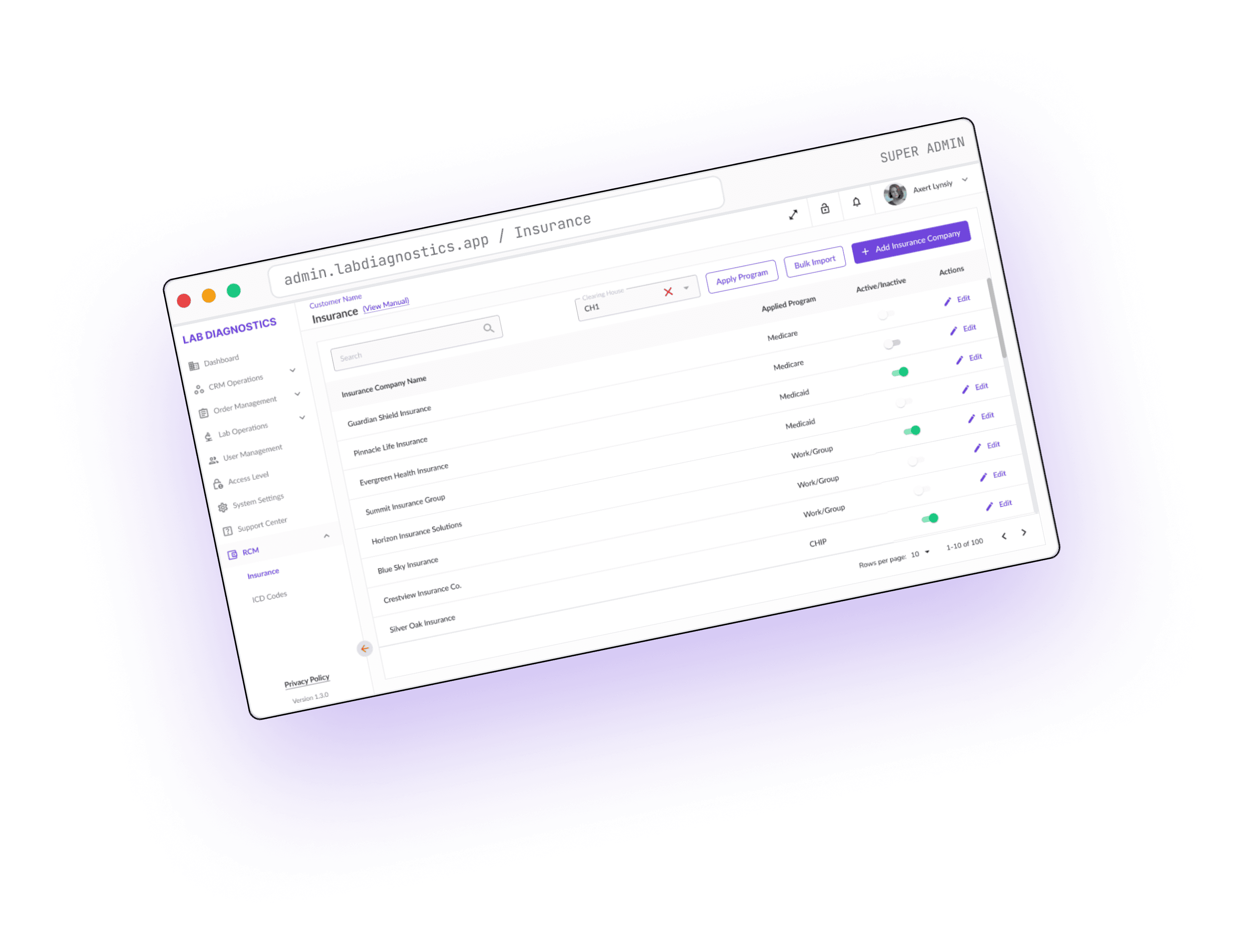
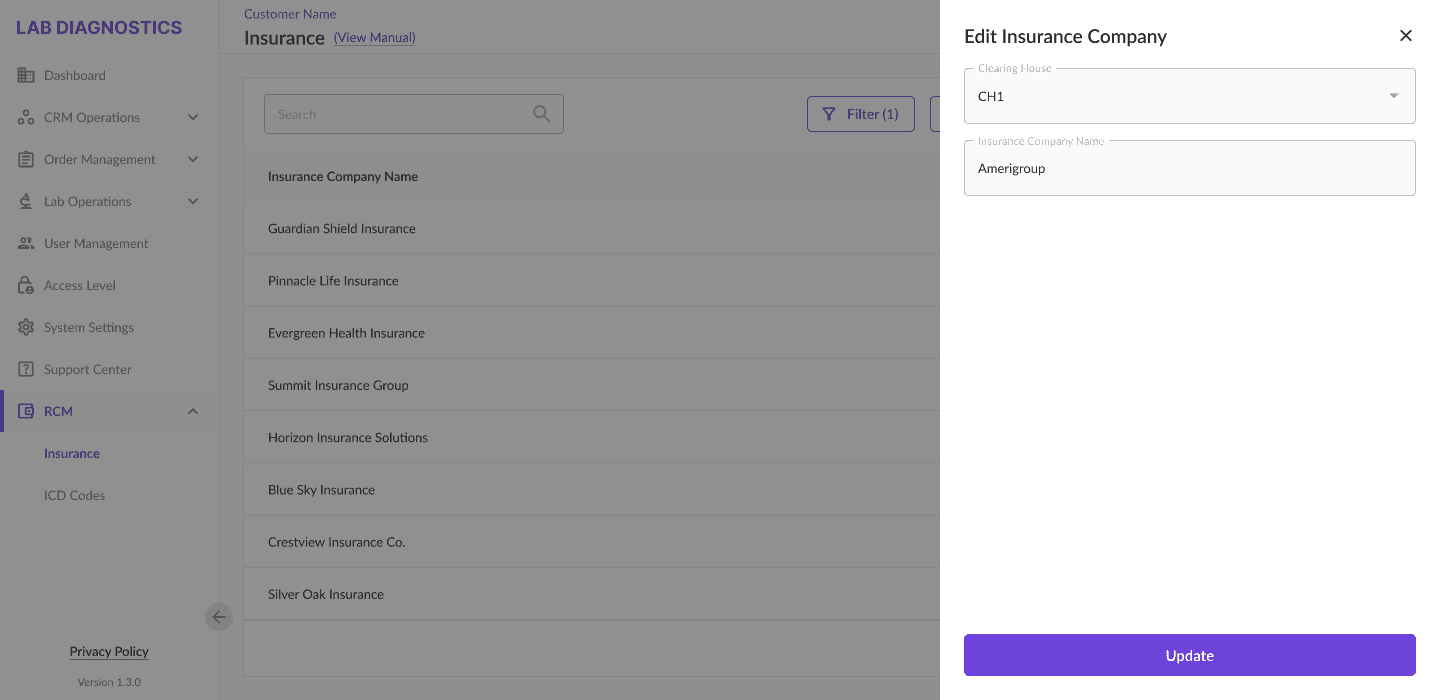
The registry is where billing / RCM staff maintain the payer side of the system: which insurance companies are active, which programs they run, and which ICD codes each combination accepts. Front-desk staff never touch it, they only see its outcome as a status on an order.
Because rules change per clearing house and program, every view is filter-first: staff narrow to a payer context before acting, so they are never editing rules blind.
DESIGN APPROACH
A single list view carries search, filters, row actions and an
active/inactive toggle, so the common operations need no navigation. Create and edit both open as side panels over that list, context stays visible behind the panel.
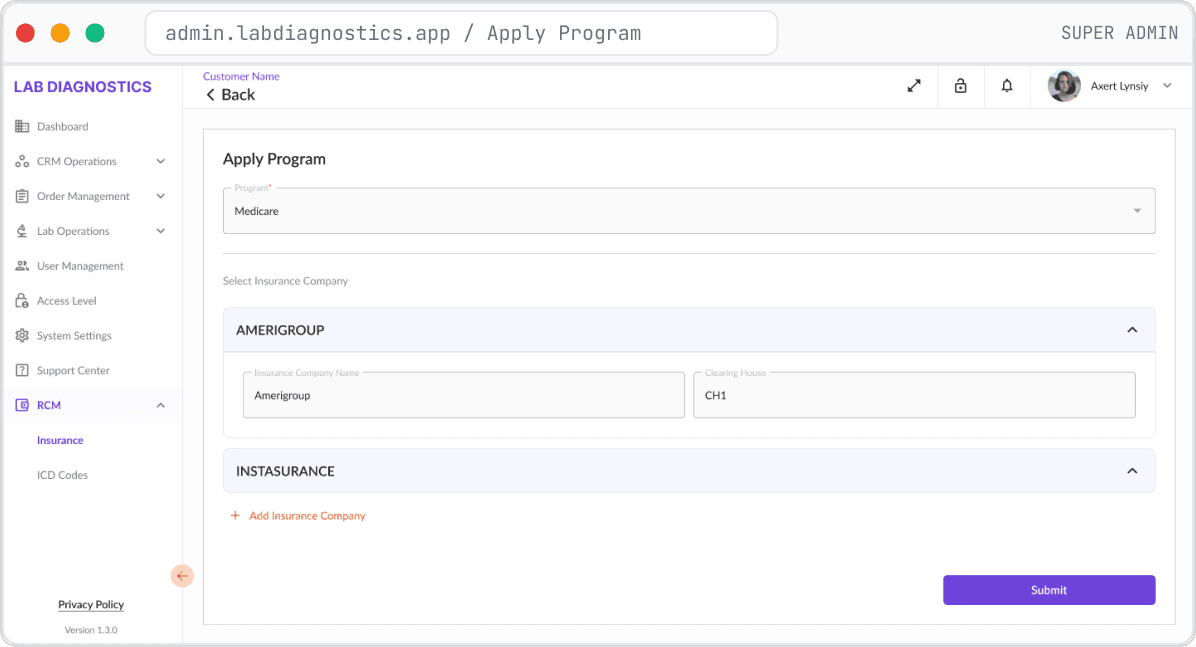
State changes and high-volume actions get an explicit gate: toggling a company active or inactive routes through a confirmation modal, and Apply Program ends in a review panel where the whole payload is re-read before it commits.
01

02
03






07 — DEEP DIVE
Filter-first by design — status is never read out of payer context
PURPOSE & USERS
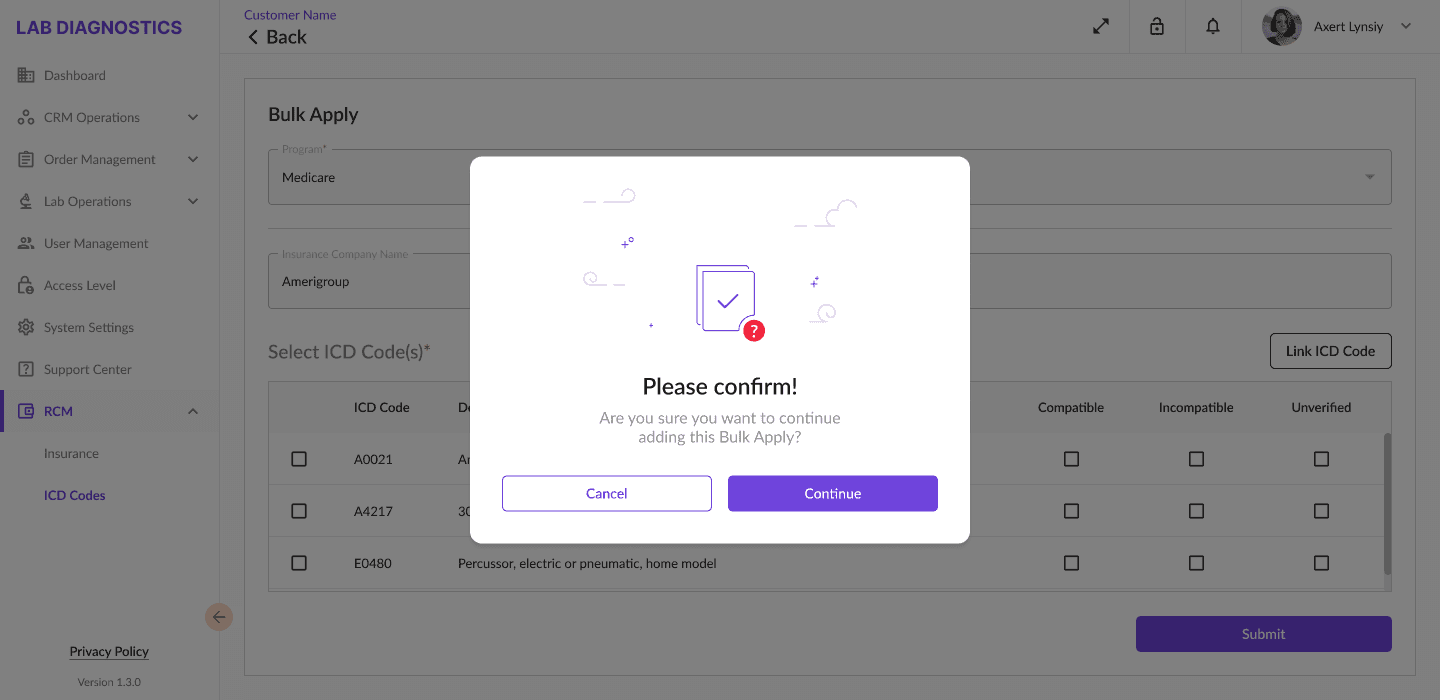
This is the rule layer the validation engine reads from. Billing / RCM staff set compatibility status per ICD code within a clearing house and program, and import whole payer lists when onboarding a new company.
One-by-one entry breaks down immediately at this scale, so the registry is designed around batch work with a checkpoint before anything is written.
DESIGN APPROACH
The registry opens in an instructive empty state "please select clearing house & program" rather than a misleading unfiltered list, so staff never read status out of context.
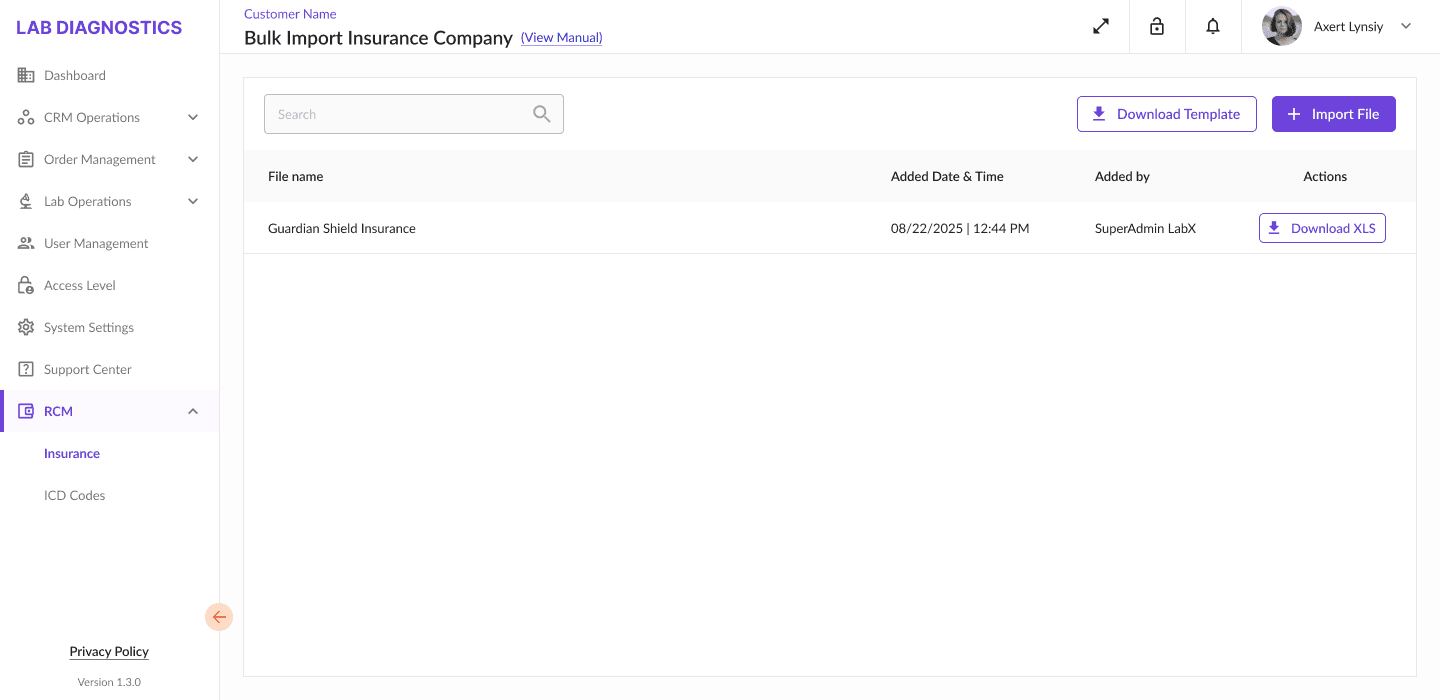
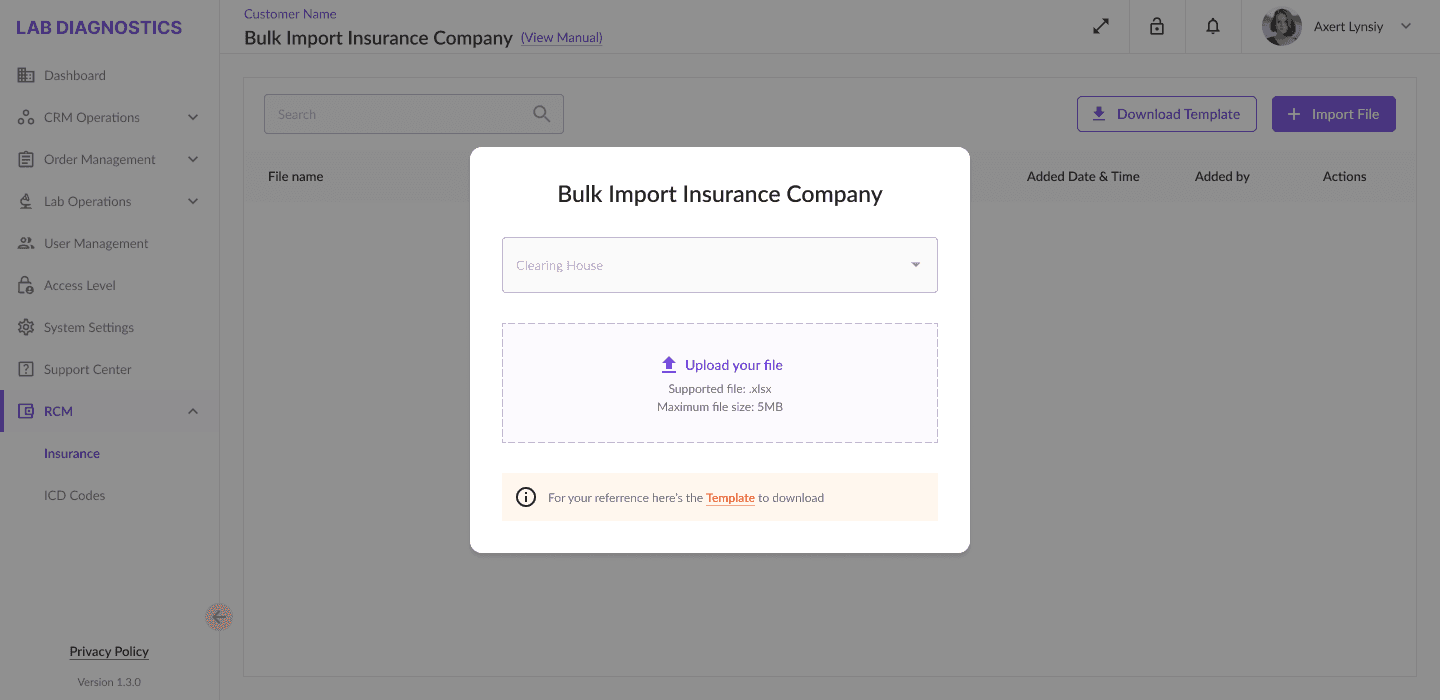
Once a payer context is set, View Compatibility resolves the code list for it, and status reads as colour on the code itself — green compatible, red incompatible, neutral unverified. Bulk import uses a drag-and-drop dropzone paired with a downloadable template, keeping the failure mode "wrong file" instead of "wrong data".
04
ICD Codes Registry — code list
Paginated code list with View Compatibility

05
Bulk Import - ICD Codes

06
Bulk Import - imported file list



08 — RATIONALE
DECISION #1
Single-Page Order Forms
CHALLENGE
Multi-step order forms slowed down order creation for staff who needed speed.
SOLUTION
Consolidated everything into one scrollable page.
WHY THIS MATTERS
Reduced friction, improved task completion rates.
DESIGN IMPACT
Longer page, but fewer clicks and less context-switching.
DECISION #2
Real-Time ICD Validation
CHALLENGE
Manual ICD validation caused claim rejections discovered weeks later.
SOLUTION
Embedded real-time validation with compatible / needs review / rejected status indicators.
WHY THIS MATTERS
Caught errors before submission, not after.
DESIGN IMPACT
Status indicators visible directly in the order and registry views.
DECISION #3
Actions Brought Into the Order View
CHALLENGE
Editing, re-ordering, and forwarding required navigating away from the order.
SOLUTION
Brought these actions directly into the order view screen.
WHY THIS MATTERS
Minimized navigation for high-frequency tasks.
DESIGN IMPACT
Fewer screens, faster task completion.
DECISION #4
Bulk Operations for Scaling
CHALLENGE
Applying compatibility rules one insurance company or ICD code at a time doesn't scale.
SOLUTION
Bulk Apply and Bulk Import workflows with preview/review steps before committing.
WHY THIS MATTERS
Let billing staff manage large rule sets without repetitive manual entry.
DESIGN IMPACT
Multi-select tables, review panels, confirmation steps.
09 — REALITY
CONSTRAINT
TRADE-OFF
ACCEPTANCE
Small labs need a lean tool, not a full LIS/LMIS
Left out test-result processing, panels, large-scale reporting
Scope discipline > feature completeness
Single-page order form
More scrolling vs. multi-step flow
Less friction was worth more scroll
Real-time validation adds a rules layer
UI needed clear status states everywhere codes appear
Compliance visibility is core to the product's value
10 — OUTCOME
Increase in Retention
Reduction in Claim Rejections
Faster Order Setup Time
✓
Increased lab retention by 30% through the simplified workflow
✓
Reduced claim rejections by 25% through automated ICD validation
✓
Cut order setup time by 40%
✓
Built a modular framework scalable to multiple insurance payors
✓
Gave labs confidence in billing through built-in compatibility checks
11 — REFLECTION
Compliance Workflows Are a Design Problem, Not
Just a Backend One
"Manual ICD validation wasn't a data problem — it was a visibility problem. Staff needed to see compatibility before submission, not after."
Real-time status indicators at the point of entry prevent downstream errors.
Scope Discipline Is a Design Skill
"The temptation was to build toward a full LIS. The right call was building exactly what small labs needed and no more."
Saying no to feature parity with full-scale systems kept the product usable.
Domain Knowledge Compounds
"I gained real understanding of US-based LIS/LMIS systems compared to Indian diagnostics practices, and how critical insurance workflows are to lab operations — particularly in the US market."
Healthcare RCM work rewards depth over generic best practices.
Bulk Operations Aren't Optional at Scale
"Once you're managing compatibility across multiple insurance companies and ICD codes, one-by-one entry breaks down fast."
Design for batch operations from the start, not as a later add-on.
Want to talk healthcare RCM, B2B SaaS, or product design? Let's connect.